How to Create Social Media Posts with AI and Save Time

Learn how to create social media posts with AI to build authority and save hours. This guide covers a practical workflow from strategy to performance.
We’ve all been there—staring at a blank canvas, trying to will the next great carousel post into existence. It's a notorious time sink for content creators, small business owners, and social media managers. The good news? You can now create social media posts with AI, and this goes far beyond just generating text. This is about automating the entire visual creation process.
Think of it like having an AI agent that acts as your in-house designer, researcher, and copywriter, all rolled into one, working autonomously in the background to produce professional graphics.
From Manual Design to Automated Creation
If you're running a small business or an agency, you know the pressure to produce high-quality, consistent social media content is relentless. The traditional way of doing things is a multi-step marathon. You brainstorm ideas, research topics, write the copy, and then comes the hardest part for most: designing a graphic that looks professional and stops the scroll.
This manual process is riddled with familiar frustrations:
- Time Constraints: Just one visual post can take hours to get right, from concept to final design. Maintaining that pace is a surefire path to burnout.
- Limited Design Skills: Not everyone is a graphic designer. Many struggle to create professional-looking visuals, which can leave a brand looking inconsistent or amateurish.
- Creative Bottlenecks: Coming up with fresh, engaging ideas every single day is exhausting. It's easy to fall into a rut of posting similar content that your audience eventually tunes out.
The big shift from manual design to automated content creation is thanks to a new wave of powerful AI content tools. These systems go way beyond writing captions; they tackle the entire visual production workflow, from research and ideation to the final graphic design.
A New Workflow Powered by AI
Imagine a workflow where you don't have to start from scratch. Instead of spending hours in a design tool, an autonomous AI agent does the heavy lifting for you in the background. This is a massive leap from basic AI writers or schedulers. The focus here is on the production of visual assets—the actual carousels, infographics, and graphical posts your audience sees in their feed.
This approach gives you a practical way to build authority without the manual labor. For instance, an AI can generate things like:
- Multi-slide educational carousels
- Educational infographics
- Visually engaging listicles
- Tips and tricks visual posts
This isn't just about making one task faster; it's about completely rethinking your content creation pipeline. By letting an AI handle the visual production, you get back precious time to focus on strategy, community engagement, and growing your business.
For anyone looking to go deeper on this, our guide on how to automate social media posts lays out even more strategies. This new way of working allows teams of any size to maintain a professional, high-impact social media presence—no dedicated design team or massive creative budget required.
Building Your AI-Powered Visual Content Strategy
Before you fire up an AI tool and hit "generate," you need a roadmap. Letting AI create content without clear direction is like driving without a destination—you’ll end up somewhere, but it’s probably not where you wanted to be. A solid strategy ensures every automated post has a purpose, stays on-brand, and moves you closer to your business goals.
First things first: what are you trying to accomplish? Are you looking to establish your reputation as the go-to expert in your industry? If so, your goal is to create authority-building educational content that answers your audience's questions. Or maybe you want to showcase your product's benefits without sounding overly promotional.
Setting clear goals is the foundation of any effective AI content workflow. It’s what turns your social media from a random collection of posts into a strategic asset that builds real authority and trust with your audience.
Choosing the Right Visual Formats
Once you know what you're aiming for, you can pick the best visual formats to get you there. Not all content types are created equal, and the right format can make a massive difference in engagement.
Think about these common authority-building formats:
- Educational Carousels: Perfect for breaking down complex topics into simple, swipeable stories. They are excellent for building expertise on platforms like Instagram and LinkedIn.
- Quick-Tip Infographics: If you want to share valuable, bite-sized advice that’s highly shareable, infographics are an ideal choice for grabbing attention in a crowded feed.
- Listicles with Graphics: A much more engaging way to present lists like "Top 5 Mistakes to Avoid" or "3 Ways to Improve X."
- Industry Insights Posts: Use compelling data or trends to create graphics that position your brand as a thought leader.
Knowing how each format serves a different purpose is a huge part of building your visual content marketing plan. For a deeper dive into how visuals drive engagement, you can check out our detailed guide on what is visual content marketing.
Preparing Your Brand Assets for Automation
The last piece of the strategy puzzle is preparing your brand for the AI. An autonomous tool like Postbae needs your core brand assets to create graphics that look like they came straight from your own design team. Getting this right is critical for maintaining a consistent, professional look.
Before you start generating anything, pull together the following:
- Your Logo: Ensure you have high-resolution versions, especially ones with a transparent background.
- Brand Color Palette: Have the specific hex codes for your primary and secondary colors ready.
- Brand Fonts: You'll need the font files or the names for your headings and body text.
By providing these assets to the AI upfront, you are programming it to adhere to your brand guidelines. This ensures every single carousel, listicle, or infographic it produces perfectly matches your brand's identity—no manual tweaks required. And while this guide focuses on static visuals, if you’re thinking about video, exploring the top AI video creation tools can open up even more ways to expand your content mix.
How to Automate Visual Post Creation Without Prompts
This is where the process becomes truly efficient. Effective use of AI isn't about writing better prompts—it's about eliminating them entirely.
Imagine a system that fills your content calendar with professional, on-brand visual graphics without you having to brainstorm, write, or design a single post. It sounds futuristic, but it’s entirely possible with the right tools.
This hands-off approach relies on autonomous AI agents. Instead of getting stuck in a loop of prompt engineering, you configure the system once. You tell it your industry, define your brand’s tone, and upload your brand kit. That’s it.
From there, the AI agent works in the background, acting like your dedicated content production team. It manages the entire multidisciplinary process that makes creating authority-building content so time-consuming.
The Autonomous Content Workflow
So, how does an AI create a month's worth of social media posts without you feeding it commands for each one? It follows a sophisticated internal process.
First, it doesn't just guess. The system starts by researching your specific industry to identify relevant topics, trends, and the questions your audience is asking.
Based on that analysis, it brainstorms a pipeline of content ideas designed to build your authority—think industry tips, myth-busting facts, or educational breakdowns. Then it conducts the research to ensure the information is accurate and valuable.
Here’s the clever part: the AI matches the content type with a proven visual layout. A step-by-step guide gets slotted into a carousel template. A quick list of tips becomes a sharp-looking listicle.
Finally, the system programmatically populates the chosen template with the researched content and your brand assets, delivering a finished, ready-to-review visual post.
The process, which is all about setting a strong strategic foundation, is mapped out below.
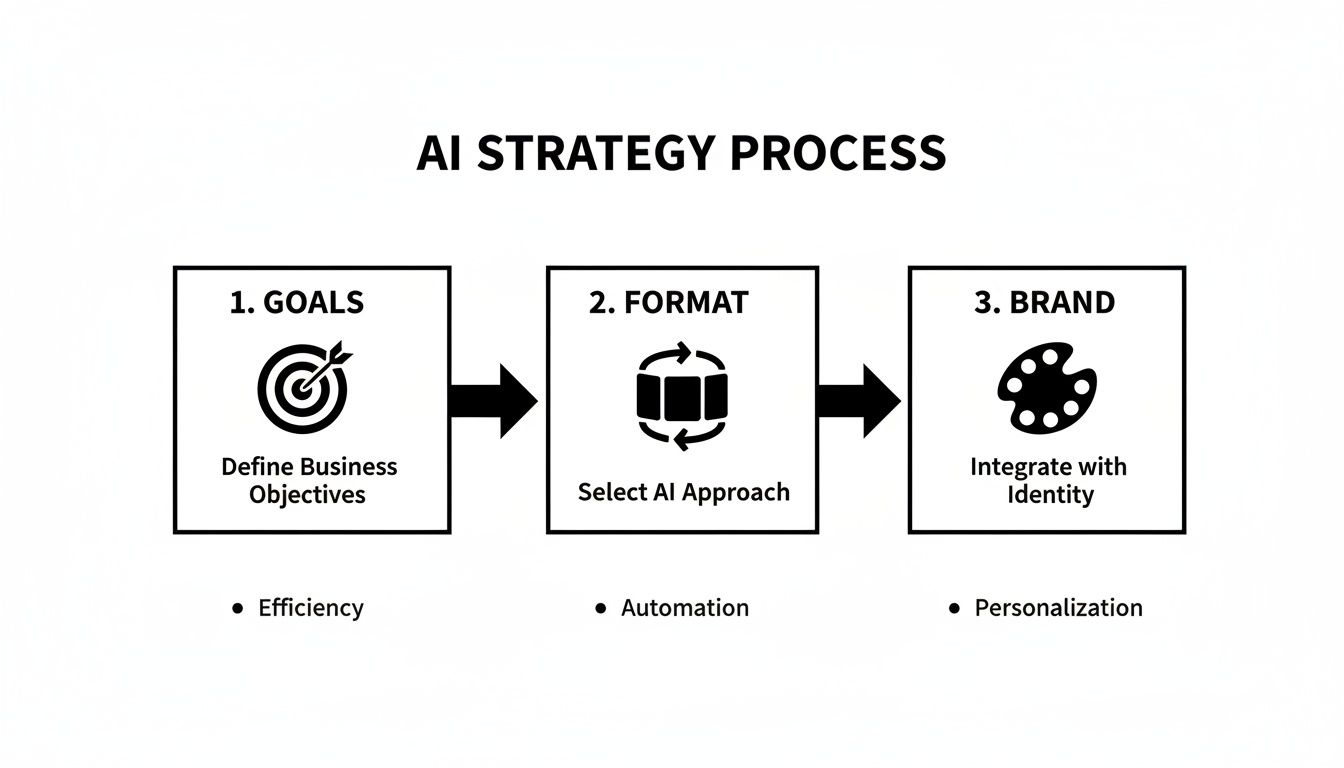
The key takeaway here is that a one-time strategic setup unlocks ongoing, automated content production. You’re no longer stuck in the weeds of day-to-day creation.
Redefining Your Role in Content Creation
This automated workflow completely shifts your role from a hands-on creator to a strategic reviewer. The creative bottleneck simply disappears.
For a marketing agency, this means you can deliver a steady stream of high-quality visuals for every client without scaling your design team.
For a small business owner, it’s like having a full-time social media manager for a fraction of the cost. You get a professional content calendar without the late nights spent in a design tool.
The point of this isn't to remove you from the process. It's to free you from the most grueling parts of it. You get back countless hours on ideation and design, and you can pour that energy into big-picture strategy and community engagement.
Even though the AI does the heavy lifting, you're always in control. You maintain full editing capability over every post.
You can tweak the messaging, inject your own unique insights, or swap out an image before anything goes live. For those looking to get even more creative, exploring different social media graphics templates can spark new ideas for layouts that really grab attention. It's the perfect blend of autonomous creation and human oversight, which is how you get authentic content that truly connects.
Reviewing and Customizing Your AI-Generated Posts
Automation is an incredible shortcut, but it’s not a replacement for your expertise. The most effective workflow to create social media posts with AI always includes a final, human touch. Even if an autonomous agent handles 90% of the work, you always have the last word and total creative control. This step is where you refine the output to perfectly match your strategy.
Think of the AI's output as an excellent first draft. Your job is to take it from great to perfect. This human-in-the-loop process combines the speed of a machine with the nuanced insight only you can provide.
The Art of the Final Polish
Reviewing your AI-generated posts isn’t about starting from scratch. It’s about making small, impactful tweaks that make all the difference.
Imagine a social media manager receives a perfectly designed carousel about new industry trends. Their value shines when they add a specific client story to one slide or tweak the call-to-action to align with a current campaign.
Here’s a quick mental checklist to run through:
- Brand Voice Alignment: Does this sound like us? Sometimes a quick headline change or a different closing sentence is all it takes to inject your brand's personality.
- Message Accuracy: AI research is powerful, but not infallible. Always give any facts, figures, or key stats a quick double-check.
- Strategic Nuance: Can I add a specific angle or a personal insight? This is your chance to layer your unique perspective on top of the AI's foundation.
- Visual Cohesion: Does the imagery hit the right note? It’s easy to swap a generic stock photo for a custom graphic or a shot of your actual product.
Your expertise is the essential ingredient. The AI handles the draining tasks—research, writing, and design—freeing you up to focus on the high-level strategy and personalization that truly connects with your audience.
Full Creative Control at Your Fingertips
The best AI content tools are built to be partners, not replacements. A platform like Postbae provides a complete editing suite, ensuring you are never locked into a design, no matter how much was automated.
Every single element of a generated post should be fully customizable. That means you can:
- Edit any text block, from the main title down to the footer text.
- Swap out images or icons to better fit your message or brand aesthetic.
- Adjust colors and layouts to experiment with different visual styles.
- Add or remove slides in a carousel to expand on a point or simplify a concept.
This level of control is non-negotiable. It’s what ensures the final post is polished, authentic, and perfectly aligned with your campaign goals. By mixing the efficiency of autonomous generation with the precision of your oversight, you get a powerful workflow that produces consistently great content without the burnout.
Publishing and Measuring Your Content Performance
You’ve created and polished your visual graphics. Now it's time to get them out into the world and see what resonates.
Creating social media posts with AI is only half the process. Real success comes from smart publishing and understanding what works. The time you’ve saved on creation can now be poured into strategic distribution and performance measurement—the activities that grow your business.
This is where you bridge the gap between creation and publishing. An autonomous tool like Postbae is a specialist; it focuses entirely on generating top-tier visual assets. That means it’s designed to integrate perfectly with your favorite scheduling tool.
Just download your finished graphics and carousels, then upload them to a platform like Buffer or Hootsuite to plan out your content calendar.
This two-tool workflow gives you the best of both worlds. You get a powerful, specialized AI for visual creation and a dedicated scheduler for optimizing your publish times and keeping your calendar organized. It keeps the entire process clean and efficient.
Optimizing Posts for Each Platform
While your visuals are ready, a little platform-specific polish can make a huge difference. Each social network has its own nuances, and tailoring your approach will dramatically improve your results.
- Instagram: Carousels and high-impact infographics are ideal here. Craft a compelling opening slide to stop the scroll and a clear call-to-action on the final slide, like "Save this post for later" or "Share your thoughts below."
- LinkedIn: This is the platform for building authority. Educational carousels that break down complex industry concepts or share professional tips are incredibly effective for establishing expertise.
- Facebook: A mix of infographics, listicles, and carousels tends to work well. Since the audience can be broader, focus on creating content that’s easily shareable and designed to spark conversation.
Remember, the AI already handled the heavy lifting of design and research. Your role is to add that final strategic layer to ensure your content gets maximum visibility and engagement on every channel.
Key Metrics for Measuring Success
Once your posts are live, it’s time to see how they’re performing. Tracking the right metrics is the only way to create a feedback loop that makes your future content even better. Instead of getting lost in vanity metrics, focus on the data that signals a genuine connection with your audience and a real impact on your business.
The goal of measurement isn't just to see how a post performed; it's to gather intelligence. Analyzing what resonates with your audience allows you to refine your approach and ensure your AI-powered workflow delivers tangible business results.
Start by tracking these core performance indicators:
- Engagement Rate: This is your most important health metric. It combines likes, comments, shares, and saves into one number that shows how much your content connected with people. A high engagement rate indicates the topic and format were successful.
- Reach and Impressions: Reach tells you how many unique people saw your post, while impressions count the total number of times it was viewed. Tracking these helps you understand your content's overall visibility.
- Saves: On platforms like Instagram, saves are a massive signal of value. When someone saves your post, they’re indicating it was useful enough to return to later. This is a clear sign of strong, authority-building content.
- Clicks: If your goal is to drive traffic to your website or a landing page, clicks are your direct measure of success. This metric ties your social media efforts directly to business goals like generating leads or sales.
Your Questions About AI Social Media, Answered
Adopting any new tool brings up questions. When it comes to using AI to create social media posts, most people have similar concerns about brand consistency, authenticity, and how the process works without constant oversight.
Let's address them directly.
Can AI Actually Create Content That Matches My Brand?
Absolutely. This isn't about generic, cookie-cutter templates. Modern AI visual creation tools are built with branding as a core component.
You can—and should—upload your entire brand kit at the beginning. This means your logo, specific hex codes for brand colors, and custom fonts are all loaded into the system. The AI uses these assets as its guide for every post it generates. This ensures every carousel, infographic, and listicle looks cohesive and professionally aligned with your brand.
Do I Have to Write a New Prompt for Every Single Post?
Not with the right tools. While some AI platforms require you to act as a prompt engineer for every graphic, more advanced AI agents are designed to be autonomous.
With a platform like Postbae, you set your preferences once—defining your industry, target audience, and brand style. After that, the AI agent works in the background, handling everything from topic ideation and research to designing the final visual posts. It doesn't need individual prompts for each piece of content. That hands-off approach is what delivers significant time savings.
Will My AI-Generated Posts Sound Generic or Robotic?
This is a valid concern, but the best workflows are built to prevent it. The key is combining AI's production power with your human expertise. The AI's job is to handle the most time-consuming parts of the process—initial research, first-draft copy, and graphic design.
The real advantage lies in the partnership between automation and expertise. You always have the final say. You can review and refine every post, tweaking the copy, adjusting a design, or injecting your own unique industry insights to make sure the content feels authentic and genuinely valuable.
This human-in-the-loop system ensures the final product is both high-quality and connects with your audience on a real level.
What Kinds of Social Media Posts Can AI Even Create?
AI excels at producing the kind of authority-building visual content that typically requires significant research and design effort. We're moving beyond simple text captions; this is about creating complete, ready-to-publish graphical assets.
Think about the formats that perform best on platforms like Instagram, Facebook, and LinkedIn:
- Multi-slide carousels perfect for breaking down educational topics.
- Data-driven infographics that turn industry insights into compelling visuals.
- Engaging listicles with custom graphics for each point.
- Quick tip & trick posts that deliver immediate, actionable value.
The goal is to automate the creation of polished, informative content that positions your brand as a go-to expert in your field.
Ready to stop staring at a blank page and start automating your visual content? With Postbae, you get a full calendar of professional, on-brand graphics created for you on autopilot. Try it today and see how easy it is to build authority and drive traffic—without ever touching a design tool.