How an AI Social Media Post Generator Creates Engaging Visuals on Autopilot

Discover how the ai social media post generator can automate your visuals, delivering engaging, high-quality graphics with less effort. Try it now.
An AI social media post generator is more than just a smart caption writer. The most advanced tools automate the entire creation of professional visual social media graphics—think multi-slide carousels, educational infographics, and engaging listicles that stop the scroll.
These powerful tools manage the whole workflow, from brainstorming industry-specific ideas and writing content to designing a polished graphic that encapsulates it all. Think of it as an automated content creation agent, not just a text assistant.
What an AI Social Media Post Generator Really Does

Let’s clear up a common misunderstanding. When many people hear "AI social media post generator," they picture an AI writer that produces a few lines of text or some hashtags. While those are useful, they only solve a small piece of the content puzzle.
A true AI social media post generator is a different kind of tool. It’s less of a writer and more like an automated design agency for your brand. It handles the entire process of creating high-impact visual content, from the initial idea to the final graphic.
Beyond Captions to Complete Visual Assets
The main function of these tools is to produce graphics that are ready to publish. This is a significant advantage, as visual content is essential for grabbing attention and driving engagement on busy social feeds. Instead of just providing text, these generators deliver the final product.
We're talking about the valuable, authority-building formats that are difficult and time-consuming to create manually:
- Multi-slide carousels for telling a compelling story or breaking down a process.
- Educational infographics that turn complex data into a simple, shareable graphic.
- Visually engaging listicles perfect for sharing tips, tricks, and best practices.
- TikTok slideshows that capture attention with quick, digestible information.
By automating these assets, an AI post generator combines the research, writing, and design phases into a single, efficient step. If you want to see what's out there, our guide on the best social media content creation tool breaks down some top options.
To get a clearer picture of how these tools differ, let's compare them.
AI Post Generators vs Traditional Social Media Tools
While many tools assist with social media, they serve very different purposes. An AI post generator is a content creator, while other tools are for writing, manual design, or scheduling.
| Feature | AI Social Media Post Generator | AI Caption Writer | Manual Design Tool |
|---|---|---|---|
| Primary Function | Creates complete visual posts (graphics + text) | Writes text captions, hashtags, and ideas | Provides a canvas for manual design |
| Core Output | Ready-to-publish carousels, infographics, listicles | Text-only content | Blank templates or design elements |
| Workflow | Fully automated from idea to final design | Requires manual input for each caption | Requires full manual design effort |
| Best For | Scaling visual content creation with minimal effort | Overcoming writer's block for post text | Creating highly custom, one-off designs |
| Example | Postbae | Jasper | Canva |
As you can see, a true generator isn't just another tool in the toolbox—it is the toolbox, combining multiple functions into one automated system.
An Automated Workflow for Authority Building
The real value is in the automation of the entire creative workflow. The most advanced platforms don't wait for your command; they work autonomously in the background.
The goal is to shift from manual, task-by-task content creation to a strategic, automated system. The generator finds relevant topics, writes the content, picks a professional layout, and builds the design—all tailored to your industry.
This is a huge advantage for producing authority-building content. This educational material establishes you as an expert and builds trust, but it's also the most difficult content to produce consistently. A generator does the heavy lifting, allowing small businesses, marketing agencies, and content creators to maintain a professional presence without the cost of a full-time design team.
For a great example of how this applies to a specific platform, a LinkedIn Post Generator With AI is built to craft content that resonates with a professional network. Ultimately, these tools offer a complete solution, not just a single part of your social media strategy.
How AI Actually Creates Your Visual Content
Ever wonder what’s really going on inside an AI social media post generator? It's not a magic black box producing random graphics. There's a logical workflow happening behind the scenes, where the AI acts like a one-person content team—doing the work of a researcher, writer, and designer combined.
The best systems are completely autonomous, meaning you don't have to feed them prompts all day. They're built to be a true content engine, working for you in the background.
This is rapidly becoming the standard. The market for AI in social media was valued at $2.7 billion and is expected to grow to $24.2 billion by 2034. Software tools make up 68% of this market, which shows that brands are leaning on platforms to automate their content creation.
Step 1: It Starts by Understanding Your Niche
Before creating a post, the AI gets to know your business. It dives into your specific industry to understand the context—who you are, who you're talking to, and what topics resonate with that audience.
This first step is critical. It’s what separates a tool that creates relevant, valuable content from one that just produces generic posts. Think of it like a new social media manager’s first week on the job; they're in research mode, building a knowledge base to speak your audience's language.
Step 2: Brainstorming Topics on Autopilot
Once the AI understands your niche, it starts brainstorming topics. Instead of waiting for you to come up with ideas, it proactively generates content themes designed to build your authority and engage your audience.
It usually focuses on educational content that positions you as the expert, such as:
- Tips and Tricks: Quick, actionable advice your followers can use.
- Industry Insights: Key trends, data, and news that matter in your field.
- Myths vs. Facts: Busting common misconceptions to build trust.
- Educational Breakdowns: Making complex subjects simple and digestible.
This completely automates the research and planning process. The system essentially builds a content calendar for you, ensuring a pipeline of fresh, valuable ideas.
Step 3: Picking the Perfect Format and Layout
With a topic selected, the AI decides the best way to present it. A simple tip might be perfect for a single, eye-catching graphic. But a step-by-step guide is better as a swipeable carousel. The AI is smart enough to match the message to the right medium.
The real power lies in matching the right message with the right medium. An AI post generator doesn't just create content; it structures it for maximum impact on visually-driven platforms like Instagram and LinkedIn.
After choosing a format—like a carousel or an infographic—the AI pairs it with a professionally designed, proven layout. This step ensures the final post is not only informative but also aesthetically pleasing and designed to stop the scroll. For more on this, check out our guide on how to automate social media posts effectively.
Step 4: Putting It All Together for the Final Output
Finally, the AI takes the generated content and populates the visual template it selected. It programmatically arranges the text and images into the layout, ensuring everything is aligned and easy to read. This is where raw information transforms into a polished graphic.
The end result is a complete visual asset, delivered without you needing to open a design tool. But the best platforms know that automation shouldn't mean losing control. Every post the AI creates remains fully editable, letting you tweak the text, swap colors, or adjust images to align with your brand's unique style before it goes live. It's the perfect mix of automated efficiency and creative control.
The Core Benefits for Your Business
Using an AI social media post generator goes beyond just making life easier. It fundamentally changes how you create content and delivers real, measurable value. The benefits touch your time, brand image, audience engagement, and your bottom line.
By taking over the entire creative process, these tools provide the kind of support that used to be reserved for companies with large marketing departments. Let’s break down the tangible ways this technology can help you achieve your business goals.
Complete Automation and Time Savings
The most immediate benefit is getting your time back. Manually producing high-quality visual content is a lengthy process involving research, brainstorming, writing copy, and graphic design. Each step consumes hours that small business owners and marketers often don't have.
An autonomous AI post generator collapses that entire workflow into a single, automated process that runs in the background. It frees you from the daily content grind. Instead of wondering what to post, you can focus on strategy, customer relationships, and growing your business.
This flowchart shows the simplified, hands-off process an AI agent follows to create your content.
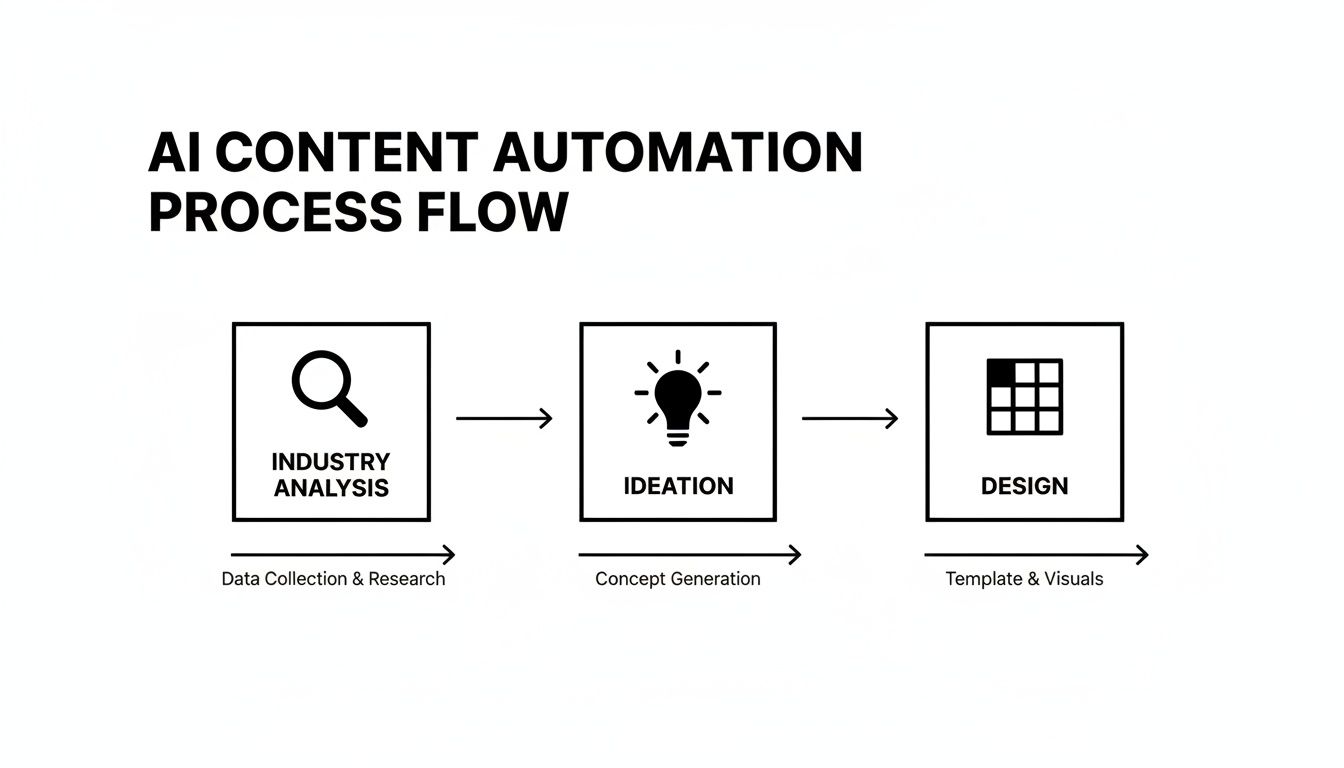
This automated flow means the system does the heavy lifting, allowing you to act as a strategic editor instead of a hands-on creator.
Consistent and High-Quality Output
Consistency is key on social media. It's the foundation of a strong brand. Posting sporadically or with varying design quality can confuse your audience and damage your credibility. An AI social media post generator solves this by delivering a steady stream of professional-looking content.
The system uses proven visual templates designed for engagement and readability. Because the AI generates industry-specific content and pairs it with these polished layouts, every post—from a multi-slide carousel to a sleek infographic—maintains a high standard of quality. This ensures your brand always looks authoritative and put-together, building trust with every post.
An AI generator acts as your brand’s quality control, ensuring every visual asset meets a professional standard. It removes the guesswork from design and helps you maintain a cohesive, trustworthy presence across all your social channels.
And while the AI handles the creation, you always have the final word. Every graphic it generates is fully editable, giving you the power to make tweaks and ensure each post aligns with your brand’s specific style guide and message.
Enhanced Authority and Audience Education
Today’s audiences want to be educated, not sold to. The best way to build a loyal following is to consistently provide value and establish your brand as an expert in your field. This is exactly what authority-building content does.
An AI post generator specializes in creating this type of educational content at scale. It can autonomously produce:
- Industry insights that keep your audience informed.
- Tips and tricks that provide instant, actionable value.
- Step-by-step guides laid out in clear, visual formats like carousels.
By filling your feed with this valuable content, you nurture your audience and build lasting trust. You become the helpful expert they turn to, which is more powerful than being just another brand promoting products.
Significant Cost-Effectiveness
For many businesses, the cost of professional social media management is a significant barrier. Hiring a full-time social media manager or a freelance graphic designer can cost thousands of dollars each month. That expense is often out of reach for startups, small businesses, and solo creators.
An AI post generator offers a powerful alternative for a fraction of the cost. For an affordable monthly subscription, often around $30, you get the output of an entire content team. It’s like having a dedicated designer and content strategist working for you 24/7. This makes a professional social media presence accessible to everyone. To see how this applies directly to smaller operations, explore our guide on AI for small business marketing.
What Makes a Great AI Post Generator?
Not all AI tools are created equal. With many platforms promising to automate your social media, it's easy to choose a tool that only does half the job. To pick the right one, you have to look past marketing claims and focus on the features that save you time and deliver results.
Think of this as your checklist for cutting through the noise. Once you know what to look for, you can confidently choose a platform that genuinely builds your content pipeline, produces professional posts, and helps you achieve your goals.
True Visual Generation Capabilities
First and most importantly: What does it actually create? Many tools call themselves "post generators" but are really just AI caption writers. They produce text, and you’re still left with the hardest part—designing a graphic.
A great AI social media post generator creates the entire visual asset from scratch. It should deliver ready-to-publish graphics, not just words.
Look for a platform that can produce formats like:
- Multi-slide carousels with a cohesive design and storytelling flow.
- Educational infographics that turn complex ideas into a single, shareable graphic.
- Listicles with graphics that make tips and recommendations easy to scroll through.
This distinction is critical. While AI adoption in marketing is common, it’s still overwhelmingly focused on text. Survey data shows that while nearly 60% of marketers use AI weekly, only 32% use it for caption generation and 23% for repurposing content. This highlights a gap in visual-first automation. A tool that creates the visuals is the one that closes this gap.
Level of Automation and Autonomy
How much work do you still have to do? This is a huge differentiator. Some tools require you to feed them a constant stream of detailed prompts, turning you into a full-time AI operator. The best systems, however, are built for autonomy.
An autonomous AI agent works for you, not because of you. It should be able to understand your industry, brainstorm topics, and generate content in the background without you having to manually prompt it every single time.
This "prompt-free" approach is where the real time savings come in. It shifts the AI from being a passive tool you have to command to a proactive partner that actively builds your content calendar.
Specialization in Authority-Building Content
What kind of content does the AI excel at creating? A general-purpose tool might produce basic promotional posts, but a specialized one will focus on the content that truly grows your brand: authority-building educational content.
This is the content designed to establish your expertise, educate your audience, and build trust. It’s what turns casual followers into loyal customers. A top-tier generator should be specifically trained to create high-value formats like industry insights, step-by-step guides, and myth-busting posts that position you as a credible leader in your space.
Full Customization and Editing Control
Automation should never mean losing control. The AI is there to do the heavy lifting and give you a great first draft, but you must have the final say. A great generator never locks you into its creations.
Make sure the platform offers full editing capabilities. You need to be able to:
- Tweak the text and headlines to match your brand voice.
- Change colors, fonts, and logos to align with your visual identity.
- Swap out images or graphics to better fit your message.
This feature is non-negotiable. It’s the key to getting the efficiency of AI without sacrificing your brand's unique personality.
Multi-Platform Support for Key Channels
Finally, where can you use the content it creates? Your social media presence isn’t on just one platform, and each channel has its own best practices. An effective AI post generator needs to create assets optimized for the channels that matter most to your business.
Look for specific support for major platforms like Instagram, Facebook, and LinkedIn. A tool that understands the nuances of each—from the visual-first nature of Instagram carousels to the professional tone required for LinkedIn—will deliver far more value than one that gives you a generic graphic. This ensures your automated content performs well wherever you post it.
The Types of Content You Can Create Automatically
An AI social media post generator's real value lies in creating high-engagement visual content that used to require hours of design work. Instead of just a caption, you get a finished, polished asset ready to stop the scroll.
Generative AI has changed the game for visual content. An estimated 34 million AI images are created every day, with over 15 billion generated since 2022. This explosion means that powerful visual storytelling is no longer limited by your design budget. You can discover more about these AI statistics and trends from recent industry analysis.
So, what kind of authority-building content can you create automatically? Let's break it down.
Multi-Slide Carousels
Carousels are an engagement powerhouse, especially on Instagram and LinkedIn. They encourage users to swipe, which boosts "dwell time" and signals to the algorithm that your content is valuable. An AI generator can build these complex posts for you automatically.
Instead of a single image, you get a cohesive, multi-slide narrative that can:
- Lay out step-by-step guides: Break down a complicated process into simple slides.
- Tell a compelling brand story: Walk your audience through your mission or a customer success.
- Share deep educational content: Dive into a topic without overwhelming your followers.
The AI handles the entire layout, ensuring each slide flows logically and visually into the next.
Educational Infographics
Infographics are the ultimate tool for making complex data, stats, or industry insights easy to understand. They're highly shareable and instantly position your brand as a go-to resource. The only problem? They are notoriously time-consuming to design.
An AI social media post generator acts as your personal data visualizer. It transforms dry facts and figures into a compelling visual story, making your most valuable insights instantly shareable and memorable.
With an automated tool, you can produce professional infographics that simplify complex topics and deliver quick value, establishing your authority in a visually appealing way.
Listicles with Graphics
Everyone loves a good list. Listicles—posts formatted as a numbered list of tips, tools, or ideas—are effective at grabbing attention. An AI post generator takes this classic format and gives it a visual upgrade.
Instead of plain text, the AI creates individual graphics for each point on the list, often arranging them in a carousel or a single image. This format is perfect for:
- Sharing "Top 5 Tips" for your industry.
- Listing essential tools or resources your audience needs.
- Highlighting the key features or benefits of your product.
This approach makes your advice more engaging and easier to remember, leading to more saves and shares.
Industry Fact and Insight Posts
Sometimes, the most powerful content is a single, impactful piece of information. An AI post generator can create a steady stream of visually striking posts that highlight one fact, statistic, or crucial industry insight.
These quick-hit posts are perfect for delivering value without asking for much of your audience's time. They're excellent for filling your content calendar and keeping your brand top-of-mind. The AI finds relevant facts for your niche and places them into a professionally designed template, ensuring your feed is always active with valuable, bite-sized content that builds your credibility over time.
Integrating AI into Your Content Workflow
Bringing a new tool into your process should make your life easier, not add another tedious step. An AI social media post generator is built to integrate into your existing marketing process, creating a smooth system where the AI handles the creative heavy lifting.
This changes your role. Instead of being stuck in daily content creation, you can focus on big-picture strategy. You become the creative director, guiding the process while automation handles the detailed work. Let's walk through what that looks like.
Initial Setup and Brand Alignment
First, you need to introduce the AI to your brand. This initial setup is the most important step for ensuring the content it creates feels genuinely yours, not generic. It's a one-time process that lays the groundwork for all future content.
During this phase, you'll typically:
- Define your industry focus: Tell the AI what you do—whether you're a local coffee shop, a SaaS company, or a fitness coach. This helps it research and generate topics that connect with your audience.
- Connect your brand assets: Upload your logo, enter your brand color codes, and choose your fonts. The AI will use these to ensure every graphic is perfectly on-brand.
Think of this as turning a general-purpose assistant into a specialist who knows your business. It’s the difference between getting cookie-cutter posts and content that looks and sounds like it came from your team.
Establishing a Simple Review Process
Once the AI has your brand instructions, it will start creating visual posts on its own. Your job is to set up a quick and painless review process. This isn't about micromanaging; it's about a quality check before anything goes public.
Your review process should be a quick checkpoint, not a creative bottleneck. The AI delivers a near-final product, allowing you to approve, schedule, or make minor edits in minutes, not hours.
A great workflow is to block off a small amount of time each week—perhaps 15-20 minutes—to look over the posts the AI has created. The best platforms provide fully editable graphics, so you can quickly tweak a headline, swap an image, or polish the copy to add a final human touch. This keeps you in creative control without slowing down the process.
Pairing with Schedulers for a Seamless System
Here’s a key distinction: an ai social media post generator creates the content, but it doesn't publish it. These tools aren't schedulers like Buffer or Hootsuite. Instead, they're designed to work with them to build a powerful, end-to-end content machine. The goal is to automate social media posts to save you time.
Here's how the pieces fit together:
- Generation: Your AI agent works in the background, autonomously creating a library of professional, on-brand graphics.
- Review: You review the posts and make any desired edits.
- Scheduling: You download the finished graphics and upload them to your favorite social media scheduler to be published automatically.
This creates a perfect handoff from content production to distribution. The AI handles the most time-consuming part—the creative work—while your scheduler handles the logistics. It's this integrated approach that lets you build a strong social media presence without the daily grind.
Got Questions? Let's Get Them Answered
Diving into new technology often brings up questions. Here are straightforward answers to the most common things people ask about AI social media generators, so you know exactly how these tools can fit into your workflow.
Will My Posts Look Like a Robot Created Them?
That’s a fair question, especially since authenticity is key on social media. Early AI tools had a reputation for producing content that felt robotic.
Today's generators are far more advanced. The best ones don't just pull random information; they analyze your specific industry to create relevant content that your audience will find useful.
Furthermore, top tools are built to create authority-building educational content. By nature, this type of content feels more authentic than a generic sales pitch. The AI focuses on delivering real value through formats like quick tips, industry stats, and insightful carousels, which makes the output feel helpful, not artificial.
Do I Still Get to Have Creative Control?
Absolutely. Automation should make your life easier, not take over your brand's voice. A good AI social media generator is your starting point, not the final word.
Think of the AI as your creative partner. It does the initial work—research, writing, and design—and hands you a professional draft. You then step in as the creative director for the final polish and approval.
Every single visual post it creates is 100% editable. That means you can jump in and tweak the text, switch up the colors and fonts, or swap out images to ensure every graphic is a perfect match for your brand identity before it goes live. You get the speed of automation while keeping the final say on everything.
How Is This Different from a Social Media Scheduler?
This is an important distinction. These two tools perform different jobs, but they work together perfectly in a modern marketing workflow.
- An AI social media post generator is for content creation. Its job is to build the actual visual assets you'll post—the graphics, carousels, and infographics. It’s the factory.
- A social media scheduler is for content distribution. Its job is to take the posts you've created and publish them on your channels at the right times. It’s the delivery truck.
So, you would use the generator to create a library of high-quality posts, and then use a scheduler like Buffer or Hootsuite to publish them. They are two halves of a seamless system for getting content made and published.
Ready to put your visual content creation on autopilot without giving up control? Postbae acts as your autonomous content agent, creating professional social media graphics for you in the background. Stop spending hours on design and start building authority effortlessly. Learn more about how Postbae works.