AI Infographic Generator: Create Pro Graphics Fast

Discover how an ai infographic generator can streamline your visuals, boost engagement, and save time - start creating professional graphics today.
Trying to get noticed online can feel like shouting into a hurricane. In a world drowning in digital noise, visuals are your lifeline. Infographics, in particular, are brilliant at turning dense data into something people actually want to look at and share.
The only problem? Making them has always been a massive pain for most businesses.
Why Visual Content Is Your Secret Weapon
In today's scroll-happy world, nobody has the patience for a wall of text. The human brain processes images 60,000 times faster than text, which makes visuals an insanely powerful tool for marketing.
A single, well-designed infographic can get a message across more effectively than a whole blog post. It boosts engagement, establishes your expertise, and gets shared.
But here's the catch: consistently creating professional-looking visuals is a huge hurdle, especially for small teams with limited time and resources.
Common Roadblocks in Content Creation
If you're a small business owner, social media manager, or content creator, this probably sounds familiar. These roadblocks can feel like they're actively working against your growth.
- Tight Budgets: Hiring a professional designer for every single social media post often isn't feasible. One custom infographic can set you back hundreds of dollars, making a consistent visual strategy feel like an unaffordable luxury.
- Limited Design Skills: Not everyone has a natural eye for design. When DIY attempts end up looking unprofessional, they can do more harm than good for your brand's reputation.
- Constant Time Pressure: The content creation cycle never stops. The entire process of researching, writing, and then designing an infographic from scratch is incredibly time-consuming, pulling you away from other critical business tasks.
It's a frustrating cycle. You know you need high-quality visuals to stand out, but you lack the budget, skills, or time to create them. Thankfully, a new category of tools has emerged to level the playing field.
An AI infographic generator is like having an automated design agency on call. It can take ideas, data, or a simple text prompt and turn it all into a polished, professional visual—without the high costs or steep learning curve.
This technology is a direct answer to the biggest content creation headaches: budget, skill, and time. By automating the design part of the process, it empowers anyone to create stunning, authority-building content that gets noticed. This shift is a huge piece of modern visual content marketing, letting teams accomplish far more with less.
How AI Infographic Generators Turn Ideas into Visuals
If you were to peek behind the curtain of an AI infographic generator, you would see a highly efficient creative process. Imagine a researcher, a copywriter, and a graphic designer all working in perfect sync. The entire operation goes from a simple idea to a finished visual in seconds, not hours.
It all starts the moment the AI gets its assignment. For some tools, that’s a text prompt you provide. For more advanced AI agents, it’s a much broader analysis of a topic or even an entire industry. The first thing the AI does is break down the core subject to identify key themes, important data points, and the main takeaways an audience needs to understand.
From Data to Design
Next, the AI acts as a content strategist. It takes all the information it just gathered and arranges it into a logical story built for visual appeal. This isn't just about dumping facts onto a canvas; it's about crafting a narrative that flows smoothly from one point to the next, making even complex topics easy for a social media audience to digest.
This is where the real magic happens:
- Intelligent Layout Selection: The AI scans a massive library of templates and picks the perfect one. It matches the structure of your information to a layout that’s proven to work, whether it’s a listicle, a process flow, or a side-by-side comparison.
- Aesthetic Pairing: It then pulls together a cohesive design, choosing complementary color palettes, easy-to-read fonts, and relevant icons that all fit the topic's overall feel.
- Automated Population: Finally, it programmatically fills the template with your content, ensuring every single element is perfectly aligned and visually balanced.
The process completely bypasses the usual roadblocks you'd hit when creating content manually.
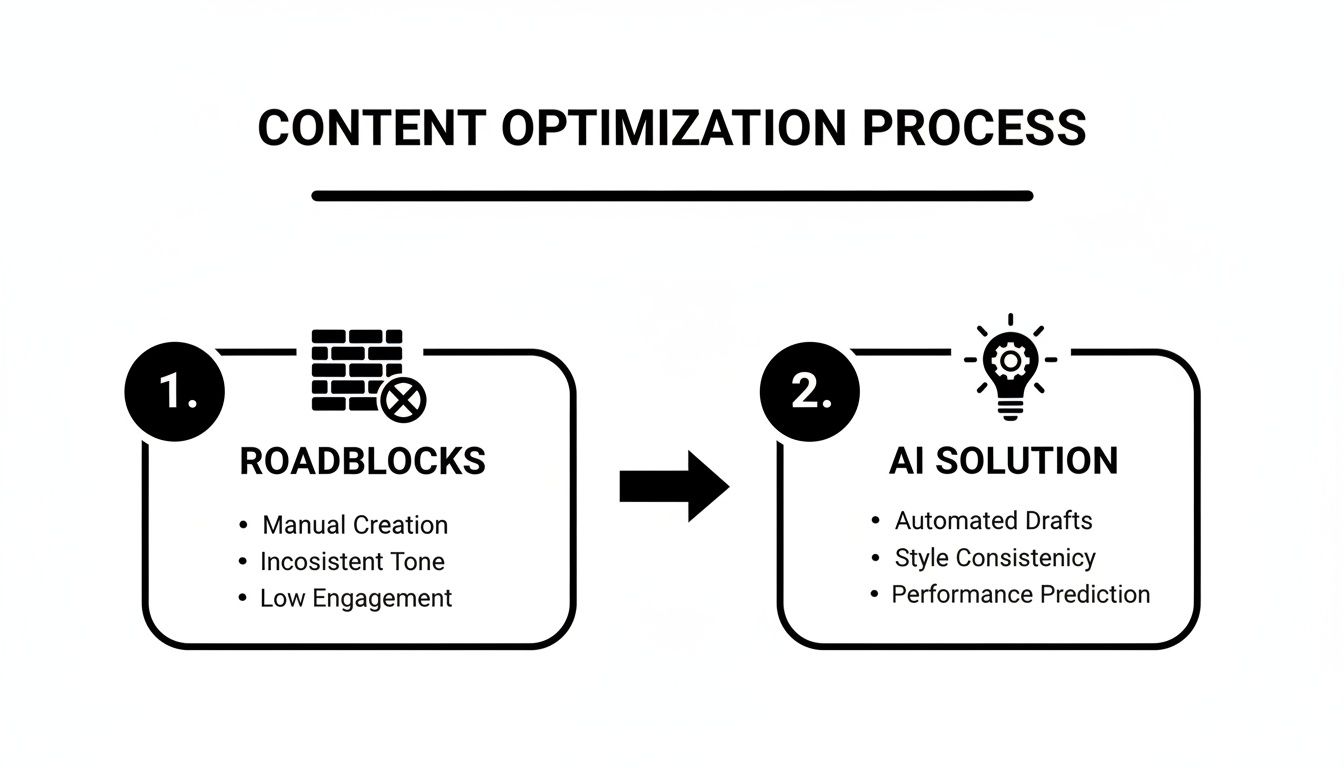
This really shows the shift from frustrating manual bottlenecks to a slick, AI-powered solution that takes care of the whole creative process for you.
The Autonomy Advantage
There’s a big difference between tools that simply assist with design and AI agents that are truly autonomous. Many tools still require you to write detailed prompts and make numerous manual tweaks. A fully autonomous AI agent like Postbae, on the other hand, works in the background to handle the entire content production process without needing prompts. It comes up with ideas, researches topics, writes the copy, and designs the final visual posts for a completely hands-off experience.
This level of automation is a significant advantage because it means you can consistently produce high-quality visual content even if you don't have the time or design skills. And you're not locked in—users always retain full editing control to tweak every detail until the final graphic is a perfect match for their brand.
Ultimately, AI infographic generators are a huge help when you want to streamline your content creation workflow and turn ideas into eye-catching visuals without the headache. The generative AI boom behind these tools is completely reshaping content creation, with the market expected to jump from $71.36 billion in 2025 to an insane $890.59 billion by 2032. This explosion shows just how much the world is moving toward automated, scalable visual content.
The Strategic Benefits for Your Business
Switching to an AI infographic generator is much more than a design upgrade—it’s a strategic decision that delivers real, measurable benefits. For small businesses and time-strapped marketers, these tools solve the biggest content challenges: time, money, and consistency.
The most immediate win? You get a massive amount of your time back. What used to be a full day of planning, writing, and experimenting in a design tool can now be done in minutes. A social media manager can generate a month's worth of high-quality, educational carousels in a single afternoon.
This isn’t just a small efficiency boost. It fundamentally changes the volume of content you can produce.
Reduce Costs and Scale Content
Hiring freelance designers or keeping a designer on staff is a significant expense, and it’s often out of reach for smaller teams. An AI infographic generator gives you the output of a professional designer for a tiny fraction of the cost, making a professional social media presence accessible to businesses of all sizes.
This affordability means you can finally scale up your content without scaling up your budget. Suddenly, creating daily visual graphics for Instagram, LinkedIn, and Facebook is a manageable task, not a financial drain.
This shift is happening on a huge scale. The global AI image generator market was valued at USD 9.10 billion in 2024 and is projected to hit USD 63.29 billion by 2030. That’s not just hype; it’s a clear signal of how critical these tools are becoming for businesses. You can read the full research on this market trend to get a sense of just how big this is.
To really see the difference, let’s compare the old way of doing things to the new way.
Table: Manual Design vs AI Infographic Generator
Here’s a quick breakdown of how the workflows and results stack up against each other. It highlights the shift from a time-intensive, manual process to an automated, scalable one.
| Aspect | Manual Design Process | AI Infographic Generator |
|---|---|---|
| Time Investment | Hours or days per infographic. | Minutes. |
| Cost | High (designer salary or freelance fees). | Low monthly subscription fee. |
| Scalability | Limited by designer's capacity. | Nearly infinite; generate dozens in an hour. |
| Brand Consistency | Relies on manual adherence to brand guides. | Baked in; automatically uses your brand styles. |
| Skill Requirement | Requires professional design skills. | None. Just provide the text or a prompt. |
| Idea Generation | Requires brainstorming from scratch. | AI assists with or fully handles content ideas. |
As you can see, it's not just about making the same thing faster. It’s about unlocking a level of content production that was previously impossible without a huge budget.
Achieve Effortless Brand Consistency
Keeping a consistent brand look across all your platforms is key to building recognition and trust. But it's also incredibly difficult to pull off manually, especially when multiple people are creating content.
An AI generator nails this by working from your pre-defined brand styles.
Every single visual it produces—from a simple listicle to a multi-slide carousel—automatically sticks to your brand’s colors, fonts, and overall aesthetic. This creates a professional and cohesive presence that strengthens your brand with every single post.
This automation gives you a reliable content engine that works for you, not against you. The strategic advantages of using AI go far beyond just making infographics; they impact your entire digital presence.
Understanding AI's role in social media marketing shows how these tools become a growth engine, letting you compete at a much higher level by consistently delivering valuable, professional content. This automation empowers you to build authority and connect with your audience more effectively than ever before.
Exploring the Types of Visuals You Can Create
Modern AI generators have come a long way from just producing simple, static infographics. A good ai infographic generator is more like a complete visual content engine, built to produce a variety of formats designed to stop the scroll on crowded social media feeds.
This means you can build out a full content strategy from a single automated tool, keeping your content fresh and interesting without having to master five different design programs.
Engaging Multi-Slide Carousels
Multi-slide carousels are a powerhouse, especially on platforms like Instagram and LinkedIn. They’re perfect for breaking down complicated topics into small, digestible chunks that encourage swiping—a key engagement signal that keeps people on your post longer.
An AI generator can build a complete, multi-slide carousel that tells a story. It intelligently organizes the information, designs each slide to be clear and impactful, and ensures there’s a logical flow from the hook on slide one to the call-to-action on the last. It completely removes the tedious work of designing each slide one by one.
Shareable Listicles and Educational Posts
Visual listicles—think "5 Tips for..." or "3 Common Mistakes to Avoid"—are highly shareable and easy for people to digest. They lay out information in a clean, scannable way that performs well across every social media platform.
Beyond just lists, a solid AI tool can produce all sorts of educational graphics. This includes myth-vs-fact comparisons, eye-opening industry stats, or handy step-by-step guides. These are the kinds of posts that position your brand as a go-to resource, building significant trust and authority with your audience.
This kind of variety is the secret to a strong strategy for your visual content for social media. It lets you educate, engage, and inform your followers without boring them with the same format every day. That variety keeps your feed feeling alive and gives people a reason to keep coming back for whatever you’re sharing next.
How to Choose the Right AI Generator for Your Needs
Not every AI infographic generator is built the same. The right tool for you really boils down to your workflow, your goals, and how much time you have. Choosing the best one means looking past the flashy demos and focusing on a few key features that will actually make a difference in your day-to-day work.
The first big decision point is the level of automation. Are you looking for a design assistant or an autonomous agent?
Some tools are essentially AI-powered design assistants. You write the prompts, feed them the content, and use AI features to speed things up. They’re fantastic if you want to stay in the driver's seat for every single post. Then there are fully autonomous agents, which are designed to be completely hands-off. They handle everything from brainstorming ideas to researching topics, writing copy, and designing the final visuals—all without requiring user prompts.
Evaluating Key Features
When you're comparing your options, it really comes down to three things that will determine if a tool is a gimmick or a valuable asset for your business.
- Automation Level: Do you want to guide the AI with prompts for every single post, or do you need a system that creates content for you in the background? For busy teams or solo entrepreneurs, a hands-off approach can save dozens of hours every month.
- Template Quality: Take a hard look at the templates. A good generator offers a solid library of professional, proven layouts for different types of content—think multi-slide carousels, listicles, or myth-vs-fact posts. You want variety and quality, not just a handful of generic designs.
- Customization and Control: Automation is great, but you must have the final say. The best tools will generate a complete, ready-to-post visual and then give you full editing control. You should be able to tweak every color, adjust any text, and swap out any icon to make sure it’s a perfect fit for your brand's unique style.
Choosing a generator isn't just about picking software; it's about finding a partner that fits your content strategy. The goal is to find a tool that empowers you to create authentic, high-quality visuals consistently, whether you’re a solo creator or a growing marketing agency.
That flexibility is what keeps your brand from looking generic. The power to fine-tune AI-generated content ensures your visuals feel like you, not like they came off a robot assembly line. If you want to dive deeper into the different options out there, our guide on the best tools for creating infographics breaks it all down to help you decide.
Visual content remains dominant on social media, and tools that make it easy to turn complex data into engaging stories are becoming essential. In fact, 21.9% of marketers now say that over three-quarters of their content is visual, a trend that's only accelerating thanks to accessible and affordable tools. Learn more about how AI is accelerating visual marketing trends. This just underscores the growing need for smart solutions that don't force you to compromise on quality or brand control.
Weaving AI Visuals into Your Content Strategy
An AI infographic generator is a fantastic production tool, but its real value is unlocked when you weave it thoughtfully into your broader content plan. It’s not just about producing visuals faster; it’s about using those visuals to achieve specific goals, whether that's building authority or sparking conversations.
The first step is to treat AI-generated graphics as a high-quality first draft—not necessarily the final product. Even though these tools can produce professional-looking designs, a few smart tweaks are what infuse them with your brand’s unique personality. This is exactly why having full editing control is non-negotiable.
Keeping Your Brand Authentic
Automation should never mean your brand’s voice gets lost in the process. To make sure every visual feels like it came from you, focus on small but impactful edits after the AI has done the heavy lifting.
- Fine-Tune the Copy: Tweak the text to match your brand's tone. Are you witty? Formal? Super casual? A quick edit can make the words sound like they came straight from you.
- Swap Out the Icons: Ditch generic icons for ones from your own brand library. This creates a much more cohesive and recognizable look across all your content.
- Add Your Logo: Always add your logo in a consistent spot on every single graphic. This is crucial for building brand recognition as your content gets shared.
Squeezing Every Last Drop of Value out of Your Visuals
One of the biggest advantages of AI-generated visuals is how easily they can be repurposed. A single, well-researched infographic contains enough material to fuel an entire week's worth of content.
Don't just post a graphic once and call it a day. Think of each AI-generated visual as a content goldmine—something you can break down, remix, and redeploy across different channels to get the most mileage out of it.
For instance, you can deconstruct a multi-slide educational carousel into individual posts for different platforms. The first slide could become a standalone tip for a quick Instagram post. A key statistic from another slide could be pulled out for a text-based update on LinkedIn.
The full infographic can serve as a header image for a blog post or get embedded right into your next email newsletter. This simple approach turns one design session into a cascade of valuable content.
Your Questions About AI Infographic Generators, Answered
Jumping into any new AI tool brings up a few questions. Here are some straightforward answers to the things people usually wonder about when they first hear about AI creating their visual content.
Can an AI Really Create Unique and Engaging Infographics?
Yes, it absolutely can. The latest AI generators are not just pulling from a static library of templates. They're much smarter than that.
The AI analyzes your information, understands the narrative you're trying to convey, and then constructs a visual story using effective design principles. The result isn't a generic graphic; it's a unique layout built specifically for your content. These systems intelligently select layouts, color schemes, and icons that match your topic, ensuring the final infographic is original and attention-grabbing.
Do I Need to Be a Designer to Use These Tools?
Not at all. In fact, that's the whole point.
These tools are built for people who aren't designers—small business owners, marketers, and content creators who have a message but lack the time or budget to hire a professional. The AI handles all the complex design tasks, like choosing fonts, balancing colors, and ensuring perfect alignment. It frees you up to focus on your message while the tool takes care of the visual presentation.
How Much Control Do I Actually Have Over the Final Design?
You have total control. While the AI does the heavy lifting and provides a polished first draft in seconds, the best platforms always let you have the final say.
After the AI generates the graphic, you should be able to jump in and tweak every single element. This includes changing the text, swapping out icons, adjusting colors to match your brand, and adding your own logo. It’s the perfect blend of automation and control, giving you speed without sacrificing your brand’s identity.
Ready to stop spending hours wrestling with design tools and start getting professional social media visuals on autopilot? Postbae is an AI agent that automatically generates ready-to-post visual social media posts, including multi-slide carousels and educational infographics, tailored to your business—no prompts needed.