How to AI Generate Social Media Posts That Drive Real Traffic

Discover how to AI generate social media posts that build authority and drive traffic. Learn to automate professional visual content that engages your audience.
When you hear "AI generate social media posts," you're probably thinking of an AI writing a caption. That's yesterday's news. The real leap forward is shifting from basic text to complete, professionally designed visual content. We're talking about AI agents that operate autonomously in the background, creating slick carousels and sharp infographics while you do literally anything else.
This isn't about saving a few minutes on copywriting; it's about turning a multi-hour design headache into a hands-off process.
Why Automated Visual Content Is No Longer a Luxury
The pressure to feed the social media beast is constant. For small businesses, agencies, and solo creators, it feels like a never-ending content treadmill. The demand is relentless, and it’s a lot more than just whipping up a quick caption. You have to be a researcher, a copywriter, and—the biggest hurdle for most—a graphic designer.
This is where things fall apart. Most teams don't have a designer on standby or the budget to hire one. So what happens? They sink hours into manual design tools, trying to piece together something that looks decent. The result is often inconsistent, amateurish graphics that do more harm than good. It screams "we're trying" instead of "we're the authority."
The True Cost of Manual Content Creation
Let's talk about the time investment. Manually creating a single, high-quality, multi-slide carousel can easily consume half a day. That's time you could’ve spent talking to customers, refining your product, or growing your business. When you need to post consistently just to stay relevant, that time cost spirals out of control fast.
The real problem isn't just the lack of time or money. It's the creative burnout that hits when you're forced to wear the strategist, writer, and designer hats all at once, day in and day out.
This is exactly the pain point automated systems are built to solve. An autonomous AI agent like Postbae takes the entire visual creation process off your plate, eliminating the bottleneck completely. Instead of just generating text, these tools deliver finished, ready-to-post visual assets.
Shifting from Text Generation to Visual Production
This is where the true innovation lies. The conversation is moving beyond AI that just writes captions. True automation means the AI handles the entire workflow:
- It sources industry-specific ideas that are actually relevant to your business.
- It writes concise copy built for visual formats, not long-winded blog posts.
- It designs professional graphics, like listicles, quote cards, and educational carousels.
- It populates proven, high-engagement templates with the content it just created.
This puts a high-impact, professional social media presence within reach for anyone, without needing a big team or a bottomless budget. It's about making authority-building content accessible, which is a massive unlock for businesses trying to grow their footprint. If you're serious about building a content engine, understanding how to scale content marketing is the next logical step, and this kind of automation is a core piece of that puzzle.
Your One-Time Setup for Autonomous Content Creation
The old way of using AI to generate social media posts is a grind. You come up with an idea, wrestle with a prompt, get some text back, and then spend what feels like an eternity in a design tool trying to make it look decent. This isn't automation; it's just a different kind of busywork.
An autonomous AI agent flips that entire process on its head.
Instead of feeding it instructions every single day, you give it a mission briefing just once. This initial setup is the brain of the operation, giving the AI everything it needs to understand your brand and start working for you in the background. Think of it less like giving a command and more like hiring and training a new social media manager.
This infographic breaks down the traditional, manual process we’re all trying to escape.
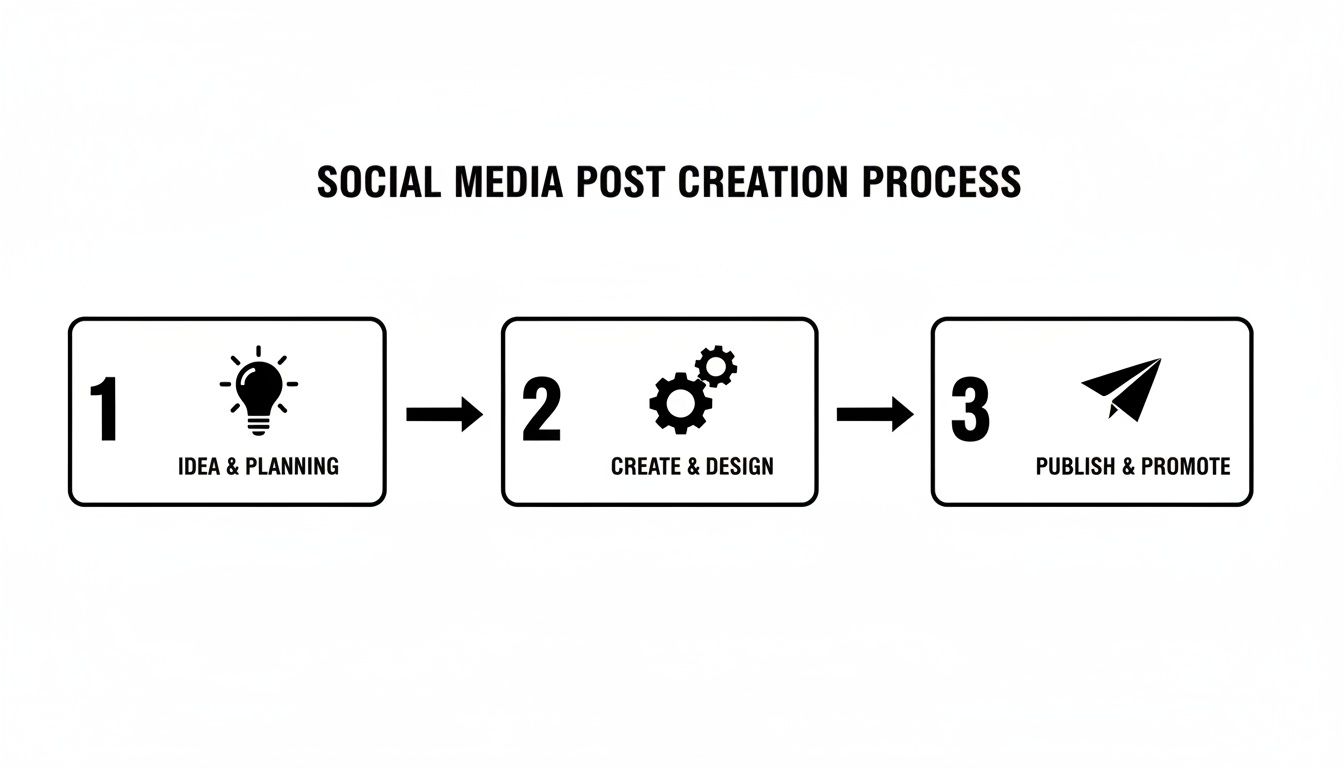
While the steps seem simple, a system like Postbae completely takes over the "Idea & Planning" and "Create & Design" stages. It hands you a finished visual, ready to post.
Defining Your Core Business Identity
This first step is where you teach the AI who you are. This isn't about one perfect prompt. It's about setting the guardrails that will guide every single piece of content it creates from here on out.
You’ll give it the core details, like:
- Your Industry: Are you a SaaS company, a local real estate agent, a wellness coach, or an e-commerce brand? This tells the AI what world to live in.
- Your Target Audience: Who are you trying to talk to? A small business owner has completely different problems than a marketing director at a large corporation.
- Your Brand Voice: What's your style? Are you professional and authoritative, or casual and a little witty?
A B2B marketing agency, for example, might define itself as a "Marketing Agency for B2B SaaS Startups." That single input gives the AI agent a clear path to start creating high-value posts about lead generation, content marketing, or product-led growth—all topics that build authority with that specific audience.
Getting this right is everything. By 2026, experts predict a staggering 90% of all online content will be AI-generated. While 78% of marketers already use AI to brainstorm, consumers are getting smarter—63% say they are less likely to engage with content that feels obviously robotic. A solid setup ensures your AI sounds like you, not like a machine.
Empowering the AI to Work on Its Own
Once you’ve laid that foundation, the AI takes the wheel. It doesn't sit around waiting for your next idea. It starts working autonomously.
The goal here is to shift your role from prompt engineer to content editor. Let the AI do the heavy lifting of creation, so you can focus on the final strategic polish.
Here’s what the agent does in the background:
- Researches Relevant Topics: Based on your industry and audience, it hunts for trending conversations, common pain points, and valuable insights your followers actually care about.
- Selects Engaging Formats: It intelligently decides if a topic works best as a multi-slide carousel, a data-packed infographic, or a simple, punchy listicle.
- Generates Visuals and Copy: The magic happens here. It designs the graphic, writes the copy, and puts it all together in a professional template.
Of course, every post it creates is fully editable. You have the final say to tweak the copy, swap an image, or adjust the layout until it’s perfect. If you're looking to build out a full autonomous system, understanding general marketing automation best practices provides a great strategic framework. And for anyone still choosing their platform, our guide to picking the right social media content creation tool can save you a ton of headaches.
This initial setup is truly your one-and-done step toward a professional and consistent social media presence that doesn’t drain all your time.
Choosing the Right Visuals for Your AI Posts (So They Don't Look Like AI)

So, your AI agent is ready to start creating social media content. But if it only creates basic, single-image posts, you’re missing a huge opportunity.
The real difference between content that gets ignored and content that builds a loyal audience often comes down to the format. A great idea packaged in the wrong format is a wasted opportunity.
Think about it. When you’re scrolling through Instagram or LinkedIn, what makes you stop? It’s rarely a generic stock photo with some text on it. It’s the multi-slide carousels that teach you something or the infographics that break down a complicated idea into something you can actually understand.
These formats work because they hold attention. They get people to swipe, pause, and absorb information, which is exactly what social algorithms love to see. A smart AI understands this. It doesn't just default to the easiest option; it thinks like a content strategist.
Matching Your Content to Formats That Actually Work
The power of a truly automated system isn't just that it writes a caption. It’s that it can analyze a topic like "5 Ways to Improve SEO" and know it belongs in a five-slide carousel, not a single, crowded image. Every single post is structured for maximum impact before you even see it.
This is becoming a non-negotiable skill. An overwhelming 97% of marketing leaders now say that every marketer needs to know their way around AI. But while 32% of marketers are using AI for captions, they're leaving a massive opportunity on the table by not using it for the whole visual post.
With 63% of consumers saying they'll tune out content that feels like it was made by AI, the goal isn’t just to automate—it's to automate with nuance. You want AI to create posts that feel human-crafted and strategic. For more on this, Sprout Social’s trend report is a great read.
A truly intelligent agent will pick from a roster of high-impact formats, including:
- Multi-Slide Carousels: These are ideal for step-by-step guides, breaking down complex topics, or telling a short story. They get users swiping and keep them engaged longer.
- Educational Infographics: Perfect for turning data, stats, or processes into a visual that's easy to digest and highly shareable.
- Listicles with Graphics: Think "Top 5 Tools" or "3 Common Mistakes." This format is incredibly scannable and hooks people scrolling through a busy feed.
- TikTok Slideshows: These are designed for the tap-through culture of short-form video, combining quick text and graphics to grab attention in seconds.
The point is simple: the AI isn't just creating content; it's packaging it in a way that your audience will actually understand and engage with. This is how you build an authoritative presence that doesn’t scream "I'm using a robot."
Understanding which format works best for which type of content is a huge part of social media strategy. Here's a quick cheat sheet to see how these formats stack up against each other.
Comparing AI-Generated Visual Post Formats
| Post Format | Best For | Platform | Key Benefit |
|---|---|---|---|
| Carousel | Storytelling, tutorials, deep-dives | Instagram, LinkedIn | High engagement, increased time on post |
| Infographic | Data visualization, complex processes | LinkedIn, Pinterest | Highly shareable, positions you as an expert |
| Listicle Graphic | Quick tips, resource roundups | Instagram, Facebook | Easy to scan, high save rate |
| Video/Slideshow | Dynamic announcements, trends | TikTok, Instagram Reels | Captures attention fast, algorithm favorite |
Ultimately, choosing the right format is a strategic decision that a smart AI can handle for you. This frees you from the guesswork of "Should this be a list or a carousel?" and ensures you're putting out a diverse mix of content that hits the mark every time. Of course, knowing the fundamentals of what makes great visual content for social media will only make your overall strategy stronger.
Refining Your AI-Generated Graphics with a Human Touch
Automation is here to do the heavy lifting, not to replace your creative direction. The smartest way to use an AI agent to generate social media posts is to treat its output as a high-quality first draft—one that a professional designer handed you.
This "human-in-the-loop" approach is about shifting your role from a creator to a sharp-eyed editor. Instead of staring at a blank canvas for hours, you get to spend minutes making small, impactful tweaks that take a graphic from "good" to "perfect." It's all about getting custom-level quality without the custom-level time investment.
The Quick-Scan Polish
When a fresh batch of visuals from your AI agent lands, your review should be fast and focused. You're not rebuilding the graphic from scratch; you're just polishing the final product. A quick, focused check maintains high quality while saving a tremendous amount of time.
Here’s a mental checklist for a 60-second review:
- Does it sound like me? The AI can mimic tone very well, but sometimes you know a better word. Swapping "discover" for "check out" can be the difference between corporate-speak and your actual voice.
- Is it on-brand? Are the brand colors exactly right? A slightly off-brand shade of blue can make your whole post feel inconsistent. It's a tiny fix with a huge impact.
- Is the CTA effective? Maybe the AI gave you "Learn More," but you know your audience responds better to "Steal My Strategy." A quick switch could significantly improve your click-through rate.
- Are the facts straight? If you're using stats or industry data, a quick sanity check is non-negotiable. It takes seconds and protects your credibility.
The real power isn't just that the posts are made for you—it's that they are 100% editable. You have total freedom to tweak every word, swap every image, and adjust every element until it's perfectly aligned with your strategy.
Making It Yours with a No-Nonsense Editor
The ability to easily modify the AI's work is essential. A solid platform like Postbae won't lock you into the first draft. It gives you a flexible editor that makes customization simple. This is where you inject your unique experience and that human intuition the machines just don't have yet.
Picture this: the AI generates a slick five-slide carousel on "Content Marketing Hacks." The information is solid, but you remember a powerful case study that would make slide three unforgettable. With a good editor, you can jump in, rewrite that slide's text, drop in a custom screenshot, and maybe even change the background color to make it pop.
That's the workflow that works. The AI handles the 90% of the creation process—the layout, the typography, the initial copy. You swoop in for the final 10% and add the human brilliance that makes people stop scrolling and connect. That's how you turn automated content into a sustainable, high-impact strategy.
Nail Your Content Publishing Workflow

Having a folder full of incredible, AI-generated graphics is a great start. But those visuals don't do you any good just sitting there. The real impact comes when you get them out into the world, consistently. This is where you connect your AI content agent to your favorite scheduling tool and build a publishing machine that practically runs itself.
The goal is to ditch the chaotic, "I need to post something" scramble and move to a calm, organized flow. When an AI is handling the heavy lifting of visual creation, you're free to focus on what actually matters: strategy, engagement, and analyzing what’s working.
A lot of marketers get stuck right here. Research shows that while 78% of social media marketers lean on AI for brainstorming and 87% agree it's vital to their strategy, the execution is where things fall apart.
The catch? 52% of consumers are wary of undisclosed AI content. So the key isn't just to automate, but to pair high-quality, human-approved visuals with a thoughtful publishing plan that builds trust, not skepticism.
Batch and Schedule Like a Pro
With a constant stream of graphics coming from your AI agent, you can finally embrace the productivity of content batching. Instead of stressing out daily, you can organize your entire week's (or month's!) content in one focused session.
It’s a simple process that changes everything.
- Quick Review: First, skim through the graphics your AI has queued up. Make any tiny adjustments needed to align with a current promotion or a trending topic.
- Bulk Upload: Next, download the finalized visuals and upload them into your scheduling tool of choice, whether that’s Buffer, Hootsuite, or another platform.
- Write Killer Captions: This is where you inject your personality. Write captions that add context, ask questions, and tell your audience exactly what to do next.
This simple batching system turns a daily grind into a weekly strategic task. You maintain a constant, professional presence without the constant, daily stress.
Write Captions That Actually Get Clicks
Your AI-made graphic is designed to stop the scroll. Your caption is what starts the conversation and gets the click. Since the visual already did the hard work of explaining the main idea, your caption can be punchy, direct, and all about action.
A great caption doesn't just describe the image; it gives the audience a clear next step. It’s your chance to turn a passive scroller into an active follower or customer.
To really make your posts pop, you need solid social media engagement strategies that get people talking and sharing. Focus every caption on a specific action. Ask a question they can't resist answering, point them to the link in your bio, or tell them to tag a friend who needs to see it. That small shift transforms your content from "nice to see" into a real engine for your business goals.
Common Questions About AI for Social Media
Diving into AI-powered social media always brings up a few questions. It's one thing to hear about AI, it's another to trust it with your brand. Let's break down the common questions people have before they let an AI take the wheel.
"Can It Actually Match My Brand's Visual Style?"
Yes, and if it can't, you're using the wrong tool. A proper AI content agent doesn't just guess. The process starts with a one-time setup where you provide your brand's DNA—your exact colors, fonts, logo, and the overall style you're going for.
Think of it as creating a strict rulebook for a designer. From that point on, every single graphic it makes follows those rules. This is how you get carousels, listicles, and infographics that look like they came straight from your in-house team.
Plus, tools like Postbae aren't a black box. You get full editing control. So, if a tiny detail feels off, you can jump in and tweak it yourself before anything sees the light of day. You always have the final say.
"So I Don't Have to Write Prompts Every Day?"
Correct, and this is the single biggest shift. Forget everything you know about spending hours trying to find the perfect prompt. An autonomous AI agent is built to make "prompt engineering" a thing of the past.
Once you’ve done that initial brand setup, the system just works. It gets to know your industry, finds relevant topics, writes the copy, and designs the entire visual post. All on its own.
This completely hands-off approach frees you from the daily grind of brainstorming. Your job shifts from being a content creator to a creative director.
You’re no longer a prompt writer—you're the strategist. The AI handles the heavy lifting, delivering a pipeline of content that's ready for your final approval.
"What Kind of Posts Does It Actually Make?"
Modern AI agents aren't just creating random quotes on a blurry background. They're designed to produce high-value, educational content that builds authority on platforms like Instagram and LinkedIn.
They create complete, ready-to-post visual assets like:
- Multi-slide carousels to break down complex ideas into easy-to-digest steps.
- Engaging listicles that offer quick tips or resources in a super scannable format.
- Data-heavy infographics to make industry stats look sharp and shareable.
- Educational posts like myth-busters or surprising industry facts.
The system is smart enough to know which format works best for the topic at hand, so you're not just getting content—you're getting content that's strategically designed to get saves, shares, and comments.
"How Do I Stop It From Sounding Like a Robot?"
Authenticity comes from mixing AI’s efficiency with your human experience. The AI isn't meant to replace you; it's meant to produce a high-quality first draft.
It creates a polished, professional graphic based on proven content formulas that grab attention. Your job is to be the final filter. You jump in and sprinkle in your own stories, add a specific client example, or tweak the tone to match your unique voice.
This "human-in-the-loop" workflow is key. A few small, smart edits can transform a great AI-generated post into an unforgettable piece of content that genuinely connects with your audience.
Ready to stop designing and start growing? With Postbae, you get a continuous stream of professional, on-brand visual posts created for you automatically. Drive traffic and build authority without ever writing a prompt. Explore how Postbae can automate your social media content today.