How to write engaging Linkedin posts to grow your audience

Discover how to write engaging linkedin posts that captivate readers, boost engagement, and grow your audience with proven tips and examples.
Writing a LinkedIn post that actually gets noticed isn't about throwing spaghetti at the wall and hoping something sticks. There’s a simple, repeatable structure that just works. It comes down to three things: a hook that stops the scroll, a body that delivers real value, and a call-to-action that actually starts a conversation.
Once you nail this combo, you'll be creating content that consistently grabs attention and builds your personal brand.
The Framework For High-Impact LinkedIn Posts
Before you even think about writing, you need to understand the anatomy of a post that people actually want to read. So many people just jump in and start typing, and the result is often a rambling, disjointed mess that gets zero engagement.
The best posts on LinkedIn? They aren't random thoughts. They're built on a solid foundation that guides the reader from that first glance all the way to hitting the comment button.
Think of this as your blueprint. Get this right, and your message will always land with clarity and impact.
The Three Pillars Of An Engaging Post
Every single post that performs well can be broken down into three key parts. Getting a feel for how they work together is your first real step toward writing content that consistently gets results.
Let's break down the essential elements of a high-performing post. Understanding these components is key to crafting content that not only stops the scroll but also encourages meaningful interaction.
Anatomy of an Engaging LinkedIn Post
| Component | Purpose | Example |
|---|---|---|
| The Hook | To grab attention and create curiosity in the first 1-2 lines. Make them click "...see more". | "99% of people get this wrong about personal branding." |
| The Body | To deliver value, share a story, or provide insights that fulfill the hook's promise. | "Here's the mistake I made and the 3 lessons I learned..." |
| The Call-to-Action | To prompt a specific action, like commenting, sharing, or asking a question. | "What's the #1 lesson you've learned about branding? Drop it in the comments." |
Mastering this simple structure ensures your posts are not only easy to read but also effective in sparking the conversations you want to have.
This Hook-Body-CTA structure isn't just a friendly suggestion; it's a proven formula that works with the way people consume content on LinkedIn. It respects their time and short attention spans, pulling them in and making it easy for them to engage.
Why This Framework Works
The LinkedIn feed is noisy. Your post is competing with hundreds of others for a few seconds of someone's attention. A structured post wins because it cuts through that noise.
The hook acts as a filter, grabbing the right people. The body delivers the goods, building trust and showing you know your stuff. And finally, the CTA turns a passive reader into an active participant—which is exactly what the LinkedIn algorithm loves to see.
For a deeper dive into the principles that fuel real conversations and grow your brand, check out this comprehensive guide on writing LinkedIn posts that get noticed.
By making this simple yet powerful structure your go-to, you'll stop just "posting" and start strategically crafting content that builds your network and drives real results.
Mastering the Scroll-Stopping Hook
You have about two seconds on LinkedIn. Two seconds to stop someone’s thumb mid-scroll. If your first line doesn't land a punch, the rest of your post is dead on arrival.
That first sentence is your scroll-stopping hook. Mastering it is the single most important skill for writing anything on LinkedIn that people will actually read.
The goal isn't just to be loud; it’s to be magnetic. A killer hook makes a specific promise or poses an intriguing question that makes clicking "...see more" feel like an absolute necessity. It's the bouncer at the door of your content—get past it, and you're in.
Think of it this way: your first line is doing all the heavy lifting. It has to slice through an endless feed of promotions, job updates, and corporate jargon to grab the right person.
The Psychology Behind a Great Hook
So, why do some opening lines just work? It usually boils down to a few core psychological triggers.
A great hook creates a tiny "information gap" in the reader's mind. You drop a surprising fact, a contrarian opinion, or a painfully relatable problem, and their brain immediately feels a little itch. The only way to scratch it is to keep reading. It’s simple, but it’s brutally effective.
Tried-and-Tested Hook Formulas
You don't need to reinvent the wheel every single time you post. The pros rely on proven formulas that can be twisted and adapted for any industry. Here are a few of my favorites.
The Surprising Statistic: Start with a number that smacks down a common assumption. Data feels credible and makes people pause. For example, "Only 1% of LinkedIn users post weekly, yet they generate 9 billion impressions."
The Controversial Take: Go against the grain. Say something that makes people either nod furiously or want to argue. Something like, "Stop chasing work-life balance. It's a myth. Aim for this instead."
The Relatable Problem: Kick things off with a pain point your audience knows all too well. This builds an instant "you get me" connection. A classic example is, "That feeling when you spend 2 hours on a post and get 3 likes? Yeah, I've been there."
Your hook is a promise. It sets an expectation that the rest of your post has to fulfill. If you start with a bold claim, your content better bring the receipts to back it up.
Examples of Hooks in Action
Let’s look at how these formulas transform a boring post into something you actually want to read. Notice how each "strong" version makes you lean in, wanting to know what happens next.
Scenario 1: Marketing Manager
Weak Hook: "I want to talk about our new marketing strategy." (Nobody cares what you want to talk about.)
Strong Hook: "We cut our ad spend by 40% last quarter. Here’s what happened to our lead quality."
Scenario 2: Software Developer
Weak Hook: "Here are some thoughts on clean code." (Snooze.)
Strong Hook: "9 out of 10 developers make this one critical mistake in their first year. I was one of them."
Scenario 3: Small Business Owner
Weak Hook: "Running a business is hard but rewarding." (Tell me something I don't know.)
Strong Hook: "The single worst piece of advice I ever received as a founder."
By obsessing over that first line, you dramatically increase the odds that people will stick around for the gold you've buried in the rest of the post. Play around with these formulas and see what your network responds to. If you're stuck, exploring a variety of social media post ideas for businesses can be a great way to get the creative juices flowing for your next killer hook.
Flesh Out Your Post (This Is Where the Magic Happens)
You’ve landed the hook. Nice. Now it’s time to deliver the goods. The body of your post is where you pay off that initial promise, turning a casual scroll into a moment of genuine insight.
This isn’t about just dumping information; it's about taking your reader on a quick but memorable journey. Your goal is to provide real value, build some trust, and give them something they can actually use.
Structure It for Scrollers, Not Scholars
Nobody is reading a dense wall of text on their phone. Ever. The structure of your post is just as crucial as the words you choose. You need to make your content look inviting and easy to scan.
Think about your own scrolling habits. You’re making split-second decisions, looking for quick wins. Your post has to cater to that behavior by being visually broken up and super digestible.
Here are a few tricks I use all the time:
Embrace the single-sentence paragraph. Seriously. It creates so much white space and makes the post feel less intimidating.
Keep paragraphs short. One to three sentences, max. This forces you to be concise and keeps the reader’s momentum going.
Break things down with lists. Bullet points or simple numbered lists are your best friends for explaining steps, sharing tips, or listing key takeaways.
The best LinkedIn posts are written for the thumb, not just the eyes. If it looks like a chore to read, people will just scroll right past it. Make it easy to consume, and the algorithm will reward you.
Give Your Story Some Bones
A post of random, disconnected thoughts will go nowhere fast. You need a framework to organize your ideas and guide your reader from point A to point B. One of the most powerful frameworks I've seen is the classic Problem-Agitate-Solution (PAS) model.
It’s a classic for a reason—it works. It taps directly into your audience's struggles and positions you as the person with the answers.
Here’s the breakdown:
Problem: Kick things off by calling out a common challenge or frustration your audience deals with. This creates an instant "oh, that's me" connection.
Agitate: Don't just state the problem; poke the bruise a little. Describe the real-world consequences and headaches it causes. Make the pain feel tangible.
Solution: This is the payoff. Introduce your tip, insight, or method as the clear and simple solution to that problem you just agitated.
Using this structure turns a simple piece of advice into a compelling mini-story that actually resonates.
Mix in a Little Bit of You
Authenticity is everything on LinkedIn. People connect with other people, not with faceless corporate jargon. Dropping in personal anecdotes or lessons you’ve learned the hard way makes your content far more relatable and trustworthy.
But here’s the key: every personal story needs to have a professional point. Your anecdote should always loop back to a clear business lesson or a piece of actionable advice. The story is the vehicle, but the value is the destination.
This is especially true when you're posting from your personal profile, which consistently crushes company pages. In fact, content shared by individuals generates 2.75 times more impressions and a whopping 5 times more engagement than when it comes from a company page. This just goes to show how much the platform's algorithm favors genuine, person-to-person interaction. You can read more about personal vs. corporate posting strategies if you want to go deeper.
Ultimately, writing a killer post body is all about delivering value in a way that’s easy and enjoyable to read. Focus on that scannable structure, lean on a proven framework like PAS, and don't be afraid to blend your personal stories with professional insights. Do that, and you'll create content that doesn't just inform—it connects.
Choosing the Right Visuals for Maximum Impact
In a feed overflowing with text updates, the right visual isn't just a nice-to-have; it's a non-negotiable. Text-only posts are basically invisible. If you want to stop the scroll and get your message across with some actual punch, you have to pair your words with killer visuals.
The type of visual you pick directly impacts how people engage with your content. A solid, high-quality image is a good start, but not all formats are created equal. Knowing the strengths of different visual types means you can match your message to the format that's going to hit the hardest.
Why Visuals Run the LinkedIn Feed
Visual content slices through the noise of the feed, making your post instantly easier to digest. Our brains process images thousands of times faster than text, which means a well-chosen graphic can land your main idea before someone even reads your first sentence.
But it’s not just about slapping any old picture on your post. The format you choose can make or break your engagement. The data is pretty clear on this: document posts, like those slick multi-slide carousels, are the undisputed champs, pulling in 278% more engagement than video and a mind-blowing 596% more engagement than plain text. That works out to a massive 6.1% engagement rate.
Don't sleep on video, either. Regular videos get 5x more engagement than text, and live video generates an insane 24x more interaction than pre-recorded ones. Even a simple image post will get you about 2x more comments than text alone.
The takeaway? Any visual beats no visual, but some formats are just on another level.
The Unbeatable Power of Document Posts and Carousels
Document posts, which you'll usually see as multi-slide PDFs or carousels, consistently crush it on LinkedIn for one simple reason: they keep people on your post longer.
Every time someone swipes through another slide, they're sending a strong positive signal to the LinkedIn algorithm. The algorithm sees that people are dwelling on your content, so it shows it to more people. Simple as that.
Carousels are perfect for:
Breaking down complex ideas: Turn a dense topic into a series of easy-to-digest, illustrated points.
Creating visual listicles: Share "5 Tips for X" or "3 Mistakes to Avoid" in a format people love to scan.
Showcasing data and infographics: Present stats and insights in a way that's visually appealing, one slide at a time.
Telling a step-by-step story: Walk your audience through a process or a case study with a clear beginning, middle, and end.
And if you're wondering where to focus your visual efforts, this chart makes it painfully obvious.
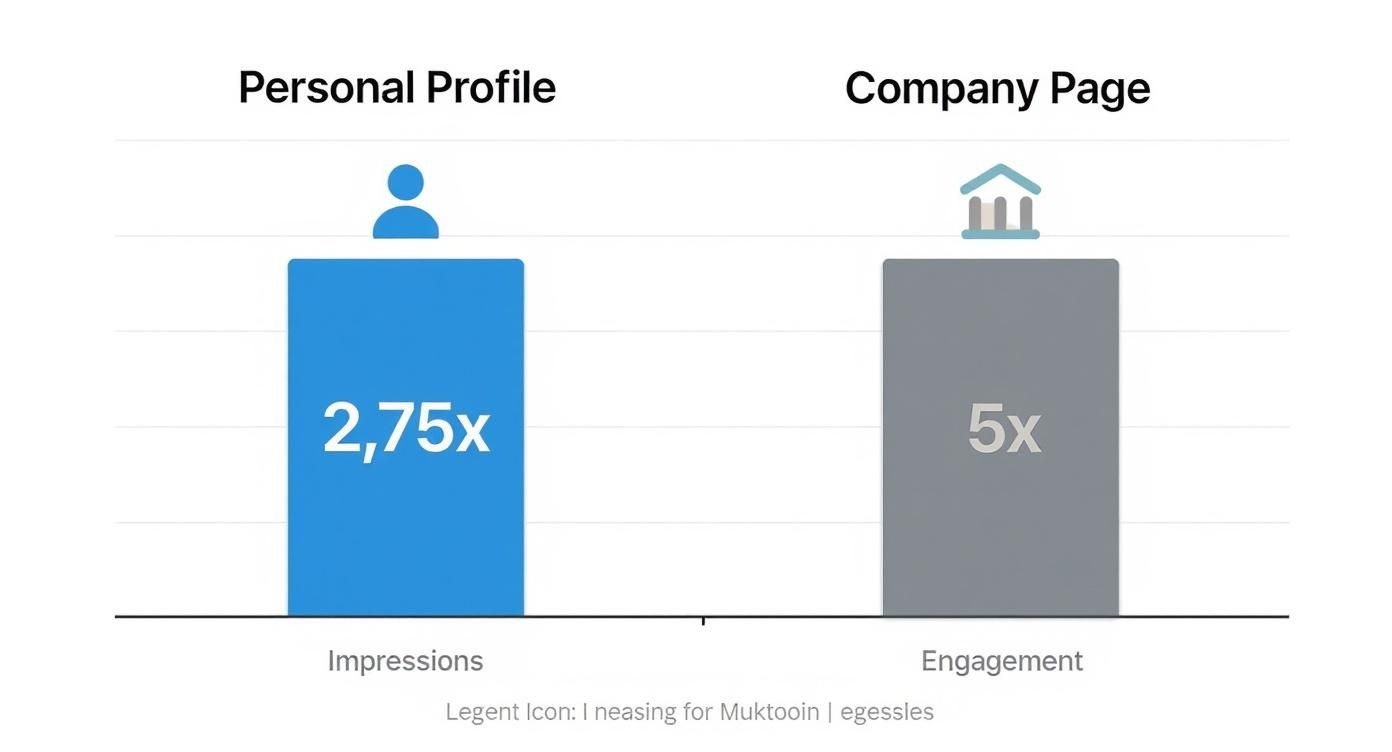
Content from personal profiles gets way more eyeballs and engagement, so your personal brand's visual game needs to be a top priority. On that note, your profile picture is the first visual anyone sees. Learning how to create AI headshots for LinkedIn that get you noticed is a small tweak that makes a huge first impression.
The real magic of carousels is their ability to deliver substantial value without overwhelming the reader. Each swipe is a small commitment that keeps the user engaged and invested in your content.
Automating High-Impact Visuals
Creating professional, multi-slide carousels can be a massive time suck, especially if you're a busy founder or social media manager who isn't a graphic designer. This is where automation becomes your secret weapon.
An AI agent like Postbae handles the creation of these high-performing visual graphics for you, working autonomously in the background. It generates industry-specific, multi-slide educational carousels, infographics, and listicles—without you even needing to feed it prompts.
It produces ready-to-post visual social media graphics that position you as an expert, and they're fully editable so you always have the final say. It's the perfect way to consistently use LinkedIn's most engaging visual formats without the headache of manual design work. If you're ready to scale your visual content, check out our guide on AI social media content creation for more ideas.
Use CTAs and Hashtags to Send Your Reach Through the Roof
You’ve done the hard part. You wrote a killer hook, packed the body with value, and maybe even dropped in a great visual. But don't pop the champagne just yet. A great post doesn't just trail off into silence; it tells the reader exactly what to do next.
This is where your Call to Action (CTA) and a few smart hashtags come in. They’re the one-two punch that turns a monologue into a dialogue and gets your content in front of new eyeballs.
Without a clear CTA, you're basically just hoping people will engage. You’ve earned their attention—now’s the time to invite them into the conversation.

That final instruction is what turns a passive scroller into an active participant. More importantly, it’s a massive signal to the LinkedIn algorithm that your post is sparking real interaction, which is exactly what you want.
Crafting a Call to Action That People Actually Answer
A good CTA is simple, direct, and asks for very little effort. If you make people think too hard, they’ll just keep scrolling. The best CTAs usually fall into a few key buckets, each with a different goal in mind.
Think about what you actually want to achieve with the post. Are you trying to kickstart a debate? Get some quick feedback? Drive people to your latest blog post? Your CTA should line up perfectly with that goal.
Here are a few CTA styles I’ve seen work time and time again:
Ask a Specific, Open-Ended Question: This is the OG for a reason. Questions beg for an answer. But don't just ask, "What do you think?" Get specific. If you just wrote about productivity, ask, "What's the one app you couldn't get through your workday without?"
Ask for a Personal Story: People love sharing their own experiences. After posting about a tough career lesson, you could ask, "What's the biggest career mistake you ever made? I'd love to hear your story in the comments."
Point to a Deeper Resource: Is your post just the tip of the iceberg? Guide them to the main event. A simple, "I broke down the whole process in my latest guide (link in the comments)" works wonders.
Prompt a Simple Choice: This is perfect for getting quick, low-effort replies. Something like, "When it comes to remote work, are you Team Office or Team WFH? Sound off below!" makes it incredibly easy for someone to chime in.
A strong CTA makes the reader feel like a participant, not just a bystander. You’re giving them explicit permission to join the conversation and showing them that their opinion actually matters.
Your Strategic Approach to Hashtags
Hashtags are your post’s secret weapon for discovery. They’re like little signposts that help people who don't follow you find your content. But slapping on the wrong ones can make you look spammy and actually hurt your reach. The name of the game is strategic selection.
Forget what you see on Instagram. The "wall of hashtags" approach does not work on LinkedIn. Here, less is almost always more.
The sweet spot is 3-5 highly relevant hashtags. This tells the algorithm exactly what your post is about without muddying the waters.
Getting the Hashtag Mix Just Right
Your goal is to blend tags with different audience sizes to give yourself the best shot at being discovered. I’ve found the most effective strategy is a mix of broad, niche, and branded tags.
Broad/Popular Hashtags: These are the big ones related to your general topic, like
#marketingor#leadership. They give you a lottery ticket to be seen by a massive audience.Niche-Specific Hashtags: These are the money makers. They’re super-focused tags that attract a smaller but way more relevant audience (think
#b2bsaasmarketingor#contentstrategy). This is how you connect with true peers and potential clients.Branded Hashtags: If you have one, always include your unique company or personal brand tag (e.g.,
#PostbaeTips). It’s a great way to group all your content together and build some brand equity over time.
When you nail the CTA and combine it with a handful of smart hashtags, you give your content the best possible chance to not only fire up your current audience but to find a brand new one, too.
Building a Consistent Posting Strategy
A single viral post feels amazing, but it’s the steady drumbeat of consistency that actually builds an audience and makes you a recognized name on LinkedIn. Going viral is a sugar rush; consistency is building a real business.
Sporadic posting basically tells the algorithm you’re not a serious player. But when you show up regularly, you’re signaling value and relevance. That’s what leads to real, sustained growth, not just one-off spikes.
The goal isn't to force yourself to post every single day if it's going to lead to burnout. It's about building a workflow you can actually stick to. This is about shifting from that reactive, "Oh crap, what should I post today?" panic to a proactive, planned approach.
Finding Your Rhythm
First things first, you need to figure out your posting cadence. For most people, posting two to five times per week is the sweet spot. It’s frequent enough to stay on your network's radar without completely taking over their feed (or your entire life).
And this isn't just a hunch; the data backs it up. Pages that post at least once a week see a wild 5.6x increase in follower growth and a 2x lift in engagement compared to those posting less. The algorithm clearly rewards reliability.
Here's a crazy stat for you: while LinkedIn has over a billion members, only 1% of them post weekly. Yet that tiny group is responsible for a mind-boggling 9 billion impressions every single week. The opportunity is massive. You can dig into more wild LinkedIn statistics and see for yourself.
Creating a Sustainable Content Workflow
A sustainable strategy is built on planning, not just random bursts of inspiration. Start by defining your core content pillars—the 3-5 key topics you want to be the go-to expert for. These pillars become your North Star, ensuring every post reinforces your authority.
Once you have your pillars, you have to embrace batch creation. Seriously, this is a game-changer. Instead of scrambling to write a single post from scratch every day, you set aside a few hours each week or month to brainstorm and draft a bunch of them at once.
Your week suddenly looks a whole lot simpler:
Plan: Map out a few ideas for each of your content pillars.
Create: Bang out the copy for several posts in one dedicated session.
Design: Get all your visuals (carousels, images, etc.) ready to go.
This turns content creation from a nagging daily chore into a scheduled, efficient block of time. If you need help structuring this, a social media content strategy template can be a lifesaver for mapping out your pillars and schedule.
Consistency isn't about being perfect; it's about being present. A simple, valuable post published on schedule is infinitely better than a "perfect" post that never gets finished.
Finally, let LinkedIn's own analytics be your guide. Check which posts are getting the most comments and shares. Look at the days and times your audience is actually online and engaging. Don't treat this data as gospel, but use it to make smarter decisions. It’s how you make sure all that consistent effort you’re putting in delivers the biggest possible impact.
Ready to put your visual content on autopilot? Postbae is an AI agent that automatically generates professional, multi-slide carousels and infographics tailored to your industry—no prompts needed. It delivers ready-to-post graphics that build your authority, giving you a consistent supply of high-impact visuals without the design work. All posts are fully editable, so you maintain complete creative control. Learn more at https://postbae.com.